



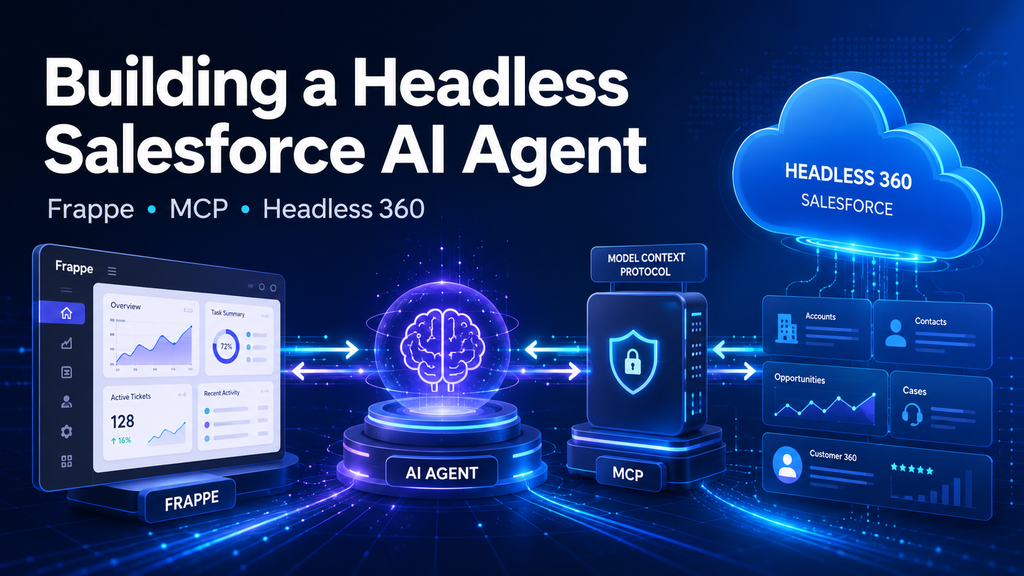
This project demonstrates how a secure Salesforce AI Agent can be built by connecting Frappe, configurable AI providers, Salesforce Hosted MCP, and Headless 360. The solution enables authenticated users to query Salesforce data, generate business insights, visualize results, export reports, and perform controlled CRM actions using natural language.
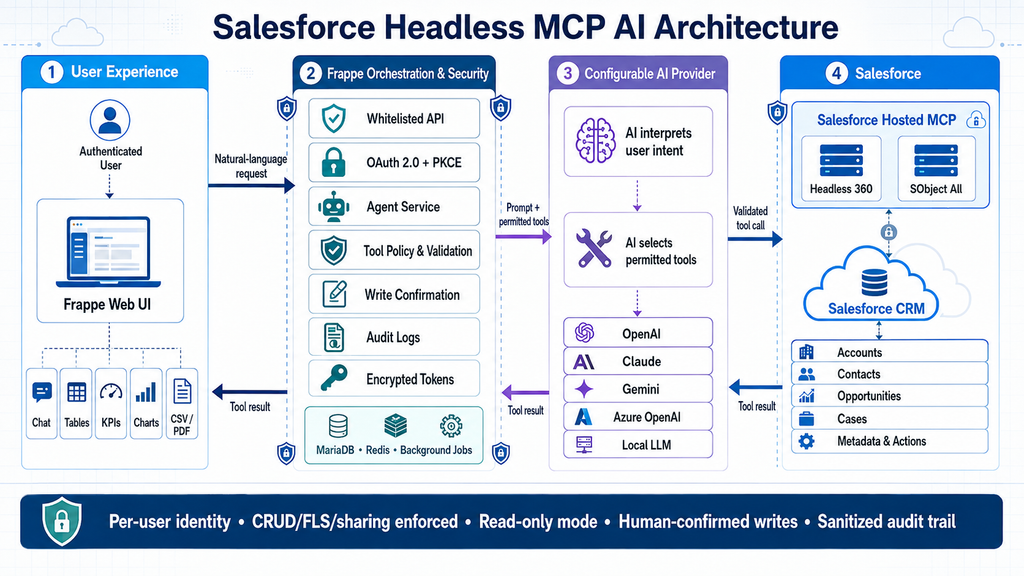
Frappe serves as the central orchestration and governance layer, managing per-user OAuth 2.0 authentication with PKCE, encrypted credentials, MCP tool discovery, security policies, audit logs, and human confirmation for write operations. The AI provider interprets user intent and selects suitable tools, while Salesforce continues to enforce object permissions, field-level security, sharing rules, profiles, and permission sets.
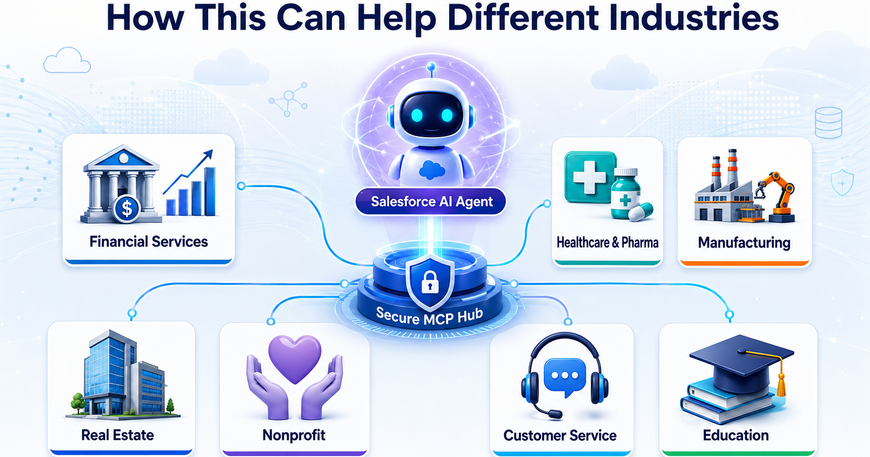
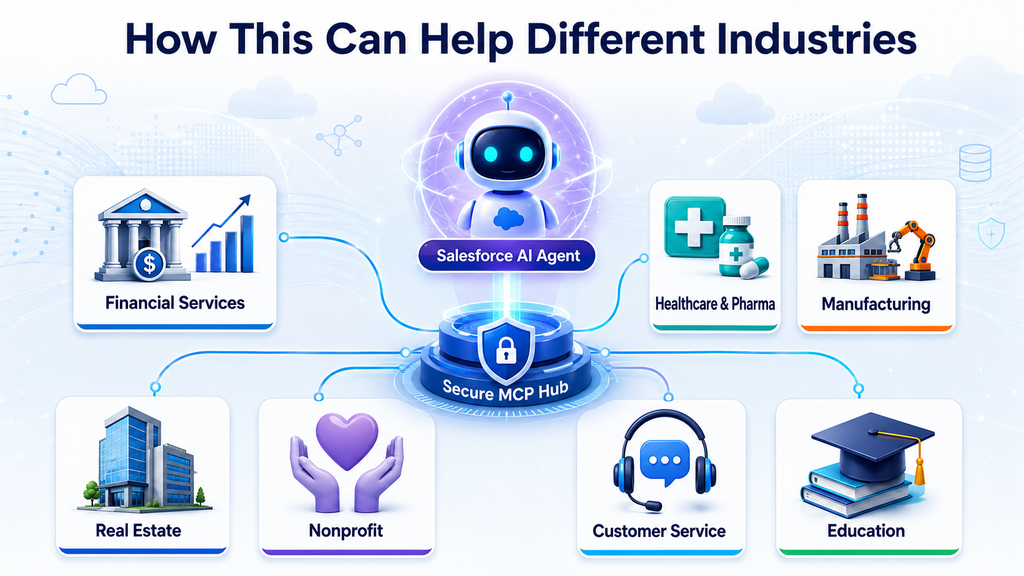
The architecture supports OpenAI, Claude, Gemini, Azure OpenAI, and local OpenAI-compatible models. It can be adapted for financial services, healthcare, manufacturing, real estate, nonprofit organizations, education, and customer service.
Developed by Reckon Technologies Ltd., this solution establishes a foundation for secure, scalable, and industry-focused enterprise AI automation across Salesforce, Frappe, ERP, and other business systems.
How I Built a Headless Salesforce AI Agent with Frappe, MCP, and Headless 360
AI becomes much more valuable when it can securely interact with real business systems—not merely generate text.
The project demonstrates the following integration flow:
Frappe → AI Provider → Salesforce Hosted MCP → Salesforce CRM
Instead of creating a separate REST API integration for every Salesforce object and business operation, the application discovers Salesforce capabilities dynamically through the Model Context Protocol.
What I Developed
I developed a Frappe Framework application called Salesforce Headless MCP AI.
The application provides a secure, provider-independent interface through which Frappe users can interact with Salesforce using natural language.
Its main capabilities include:
- Per-user Salesforce authentication using OAuth 2.0 Authorization Code Flow and PKCE S256
- Integration with Salesforce Hosted MCP servers
- Runtime discovery of available Salesforce MCP tools
- Read-only Salesforce querying
- Controlled Salesforce create and update operations
- Mandatory user confirmation before sensitive write operations
- Support for OpenAI, Claude, Gemini, Azure OpenAI, and local OpenAI-compatible models
- Structured tables generated from Salesforce records
- KPI summaries and charts
- CSV and PDF exports
- Per-user Salesforce connection management
- Encrypted storage of access tokens, refresh tokens, client secrets, and AI API keys
- Sanitized AI and MCP execution traces
- Server-side audit logging
- Tool-call limits and configurable request timeouts
The frontend runs as an authenticated Frappe website route at:
/salesforce-ai
From this interface, a connected user could make requests such as:
- “Show me the five largest open opportunities.”
- “List high-priority cases that have not been updated in three days.”
- “Calculate the total value of opportunities expected to close this month.”
- “Summarize the pipeline by stage.”
- “Export these results as CSV.”
- “Update the priority of this case.”
For a read operation, the application can execute the appropriate Salesforce tool and return the results immediately.
For a write operation, the application can pause, display the proposed action and parameters, and require the user to explicitly confirm or cancel it.
What Is Model Context Protocol?
Model Context Protocol, or MCP, is an open standard that allows AI applications to discover and use external tools, data sources, and business services through a consistent interface.
A helpful way to understand MCP is to think of it as a universal adapter for AI applications.
Without MCP, an AI application normally needs custom integration code for every system:
- One API integration for Salesforce
- Another for ERP
- Another for document storage
- Another for analytics
- Another for internal business services
Each integration may use different authentication methods, schemas, endpoints, request formats, and error-handling patterns.
MCP creates a standardized interaction model:
- The AI client connects to an MCP server.
- The server publishes the tools it supports.
- The AI model examines the available tool definitions.
- The model selects an appropriate tool based on the user’s request.
- The application validates and executes the tool.
- The result is returned to the model.
- The model converts the technical result into a useful response.
Salesforce describes Hosted MCP Servers as managed entry points through which external AI agents can securely interact with Salesforce data, logic, metadata, and other capabilities while remaining inside Salesforce’s identity, permission, and governance model. Salesforce Hosted MCP overview
MCP therefore does not replace authentication, permissions, validation, or business rules. It standardizes how an AI application discovers and requests platform capabilities.
What Is Salesforce Headless 360?
Salesforce Headless 360 represents a broader approach to making Salesforce capabilities available outside the standard Salesforce user interface.
In this context, “headless” means that Salesforce functionality can be consumed by another interface, application, AI assistant, developer tool, mobile application, or automation system.
The Headless 360 MCP Server is a Salesforce-hosted MCP service designed to expose a broad range of Salesforce platform capabilities through a small and stable tool surface.
Instead of sending thousands of individual Salesforce tools to an AI model, Headless 360 uses four primary tools:
- Discover: Finds Salesforce skills or operations relevant to the request.
- Describe: Returns the technical requirements, parameters, dependencies, and execution sequence for a selected operation.
- Dispatch: Executes an operation that may create or modify data or configuration.
- Dispatch Read Only: Executes an operation classified as read-only.
This architecture helps reduce tool-selection complexity, context-window consumption, token usage, and model confusion. Salesforce can expand the library of supported operations without forcing every connected AI client to load thousands of tool definitions. Salesforce Headless 360 announcement
As of August 2026, Headless 360 is a Beta service. It is intended to bring Salesforce’s broader platform and Setup capabilities to MCP-aware agents through a single managed connection. Headless 360 documentation
It is important not to confuse Headless 360 with Data 360. Data 360 MCP focuses on unified customer data, while Headless 360 is designed to provide broader access across Salesforce platform capabilities.
How I Connected Frappe, AI, and Salesforce MCP
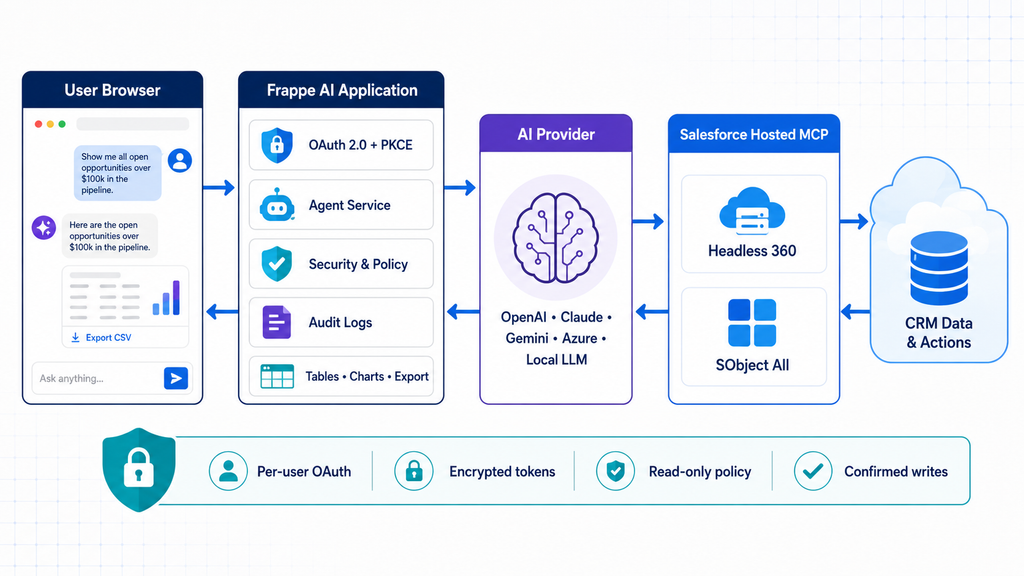
The solution contains four major layers.
1. The User Interface
The user signs into Frappe and opens the Salesforce AI page.
The interface provides:
- Salesforce connection status
- Natural-language chat
- Suggested prompts
- Waiting and execution indicators
- Structured Salesforce record tables
- KPI cards
- Charts
- CSV and PDF export controls
- MCP execution traces
- Confirmation and cancellation controls for write operations
The browser never receives Salesforce access tokens, refresh tokens, External Client App secrets, or AI-provider API keys.
2. Frappe as the Orchestration and Security Layer
Frappe is the central control layer of the solution.
It manages:
- User authentication and roles
- Salesforce OAuth lifecycle
- PKCE state and verifier handling
- Encrypted credential storage
- AI-provider configuration
- MCP connection management
- Tool discovery and filtering
- Read-versus-write classification
- Write confirmations
- Audit logging
- Record presentation and exports
Each Frappe user has an independent Salesforce Connection record. This prevents one user’s Salesforce identity or tokens from being used by another user.
3. The AI Provider
The application does not depend on only one AI provider.
A common service layer supports:
- OpenAI
- Anthropic Claude
- Google Gemini
- Azure OpenAI
- Local OpenAI-compatible models
The selected model receives:
- The user’s question
- Fixed safety instructions
- The permitted MCP tool definitions
- Results returned by previously executed tools
The AI model interprets the user’s intention and chooses an appropriate MCP tool. However, the AI model is not treated as the security boundary.
Frappe independently validates the requested tool before execution.
4. Salesforce Hosted MCP
Frappe opens a streamable HTTP MCP session with an approved Salesforce Hosted MCP endpoint.
Depending on configuration, the application can connect to services such as:
- Headless 360
- SObject All
- Sandbox MCP endpoints
- Production MCP endpoints
Salesforce authenticates the user and applies its existing security controls. Object permissions, field-level security, sharing rules, profiles, and permission sets continue to govern what the user can access. Salesforce documents that standard Hosted MCP servers execute within the authenticated user’s permissions. Salesforce standard MCP server reference
End-to-End Request Flow
When a user submits a question, the application performs the following sequence:
- Frappe validates the user, role, connection, configuration, and prompt.
- The system retrieves or refreshes the user’s encrypted Salesforce token.
- Frappe opens a Salesforce MCP session.
- The application discovers the available MCP tools.
- Server-side policies remove disallowed tools.
- The permitted tools and user request are sent to the selected AI provider.
- The AI model selects an appropriate tool.
- Frappe validates the tool name, arguments, classification, and call budget.
- The tool is executed through Salesforce Hosted MCP.
- Salesforce applies the authenticated user’s permissions.
- The result returns to Frappe and then to the AI model.
- The AI model produces a user-friendly answer.
- Frappe detects record datasets and builds tables, KPIs, charts, and exports.
- A sanitized audit record is created when audit logging is enabled.
For a write request, the process changes after tool validation.
Instead of executing immediately, Frappe stores the proposed action in a short-lived, user-bound cache. The user sees the tool name and proposed arguments and must confirm or cancel the operation.
Once confirmed, the cached action is deleted before execution, making the confirmation single-use.
Why the Security Layer Matters
Giving an AI model direct access to enterprise systems without independent controls would be dangerous.
This application therefore uses multiple layers of protection:
- Per-user Salesforce OAuth
- PKCE S256
- Encrypted token and secret storage
- Expiring and one-time OAuth state
- Approved Salesforce endpoint validation
- Tool filtering before tools reach the AI model
- Independent Python-side tool classification
- Read-only operating mode
- Optional write enablement
- Explicit confirmation for mutations
- Maximum tool-call limits
- User-bound pending actions and exports
- Redacted and bounded logs
- Salesforce CRUD, FLS, sharing, profile, and permission-set enforcement
The AI model decides what may be useful, but the backend decides what is allowed.
How This Can Help Different Industries
The same architecture can support many industries because it converts natural-language requests into governed Salesforce operations.
Financial Services
A relationship manager could ask:
- “Show customers with high-value opportunities but no activity in the last 30 days.”
- “Summarize pending loan cases by stage and branch.”
- “Find accounts with overdue compliance reviews.”
Write operations could update case ownership or create follow-up tasks after confirmation.
Healthcare and Pharmaceuticals
Sales and service teams could ask:
- “List healthcare professionals who have not been visited this quarter.”
- “Summarize product complaints by region.”
- “Show samples distributed by representative and product.”
- “Find high-priority cases awaiting medical review.”
The Salesforce permission model remains essential when handling sensitive information.
Manufacturing and Distribution
Teams could use natural-language requests to:
- Review dealer opportunities
- Identify delayed orders
- Summarize service cases by product
- Find assets approaching warranty expiry
- Analyze regional sales pipelines
Real Estate
Sales teams could ask:
- “Show all available units in Project A.”
- “List customers with overdue installments.”
- “Summarize bookings by project and sales representative.”
- “Create a follow-up task for these prospects.”
Frappe or ERPNext could remain the operational system while Salesforce manages the customer journey.
Nonprofit Organizations
Fundraising teams could ask:
- “Show donors who contributed last year but not this year.”
- “Summarize active grants by program.”
- “Find major donors without a recent engagement.”
- “Create follow-up tasks for the fundraising team.”
Customer Service
Service managers could ask:
- “Show critical cases older than 24 hours.”
- “Identify cases that may violate SLA.”
- “Summarize case volume by product and priority.”
- “Assign selected cases to the escalation queue.”
Education
Institutions could use the architecture to:
- Analyze admissions pipelines
- Track student support cases
- Identify incomplete applications
- Summarize recruitment campaigns
- Create counselor follow-up activities
What Can Be Improved Next
The current project establishes the core architecture, but several improvements could make it more scalable and production-ready.
Asynchronous Agent Execution
Long-running requests should move to Frappe background jobs.
Instead of holding a browser request open while several MCP and AI calls execute, the application could:
- Create an Agent Job document.
- Queue the work through
frappe.enqueue. - Stream progress through Frappe realtime events.
- Allow users to leave and reopen the conversation.
- Support cancellation and retry.
Conversation Persistence
The application could introduce persistent conversation and message DocTypes.
This would support:
- Conversation history
- Follow-up questions
- Saved reports
- Shared team conversations
- Conversation-level permissions
- Long-running investigation workflows
Industry-Specific Agent Skills
Reusable prompt and policy packages could be created for:
- Banking
- Insurance
- Pharmaceutical sales
- Real estate
- Manufacturing
- Nonprofit fundraising
- Customer support
Each package could contain approved objects, preferred tools, business terminology, standard questions, and output templates.
Stronger Policy Management
Administrators could configure policies by:
- Frappe role
- Salesforce object
- MCP tool
- operation type
- environment
- department
- risk level
For example, sales representatives could receive read-only Opportunity access, while managers could update selected fields after confirmation.
Approval Workflows
High-risk actions could use multi-level approval.
A proposed operation could require:
- User confirmation
- Manager approval
- Compliance approval
- Final execution
This would be valuable in financial services, healthcare, government, and regulated industries.
Retrieval-Augmented Generation
The agent could combine Salesforce MCP results with internal documents, policies, product manuals, ERP data, and knowledge bases.
A user could then ask:
“Review this customer’s Salesforce history, unpaid ERP invoices, active service cases, and contract conditions, and recommend the next action.”
Evaluation and Monitoring
Production deployment should include:
- Prompt evaluation datasets
- Tool-selection accuracy measurement
- Read/write classification tests
- Hallucination tracking
- Latency monitoring
- Token and provider-cost monitoring
- MCP error-rate dashboards
- Security and redaction tests
Additional Enterprise Controls
Future versions could add:
- Customer-managed encryption keys
- Configurable audit retention
- IP and network restrictions
- Data-loss-prevention policies
- Sensitive-field masking
- Environment-specific tool policies
- Formal human-in-the-loop approval queues
Final Thoughts
Salesforce MCP changes the integration model from building a separate hard-coded API workflow for every question to giving an AI agent a governed set of discoverable platform capabilities.
Frappe provides an effective middle layer because it can manage authentication, roles, configuration, approvals, audit records, background jobs, business workflows, and custom user experiences.
In this project:
- Frappe provides orchestration and governance.
- The AI model understands the user’s intention and selects tools.
- Salesforce Hosted MCP exposes platform capabilities.
- Salesforce remains the final authority for data access and permissions.
The result is not simply a chatbot connected to Salesforce. It is the foundation of a secure, headless, multi-provider enterprise AI platform that can be adapted to different industries and business processes.
This Salesforce Headless MCP AI solution was designed and developed by Reckon Technologies Ltd. as part of our ongoing work in Salesforce, Frappe, enterprise integration, and agentic AI automation.
Reckon Technologies Ltd. specializes in:
- Salesforce consulting, architecture, and development
- Frappe and ERPNext application development
- AI agents and business-process automation
- Salesforce, ERP, and third-party system integration
- Cloud application development
- Data analytics and business intelligence
We help organizations build secure, scalable, and industry-focused solutions by connecting CRM, ERP, AI, and enterprise data platforms.
Website: www.reckon.tech
GitHub Project: Salesforce Headless MCP AI
